
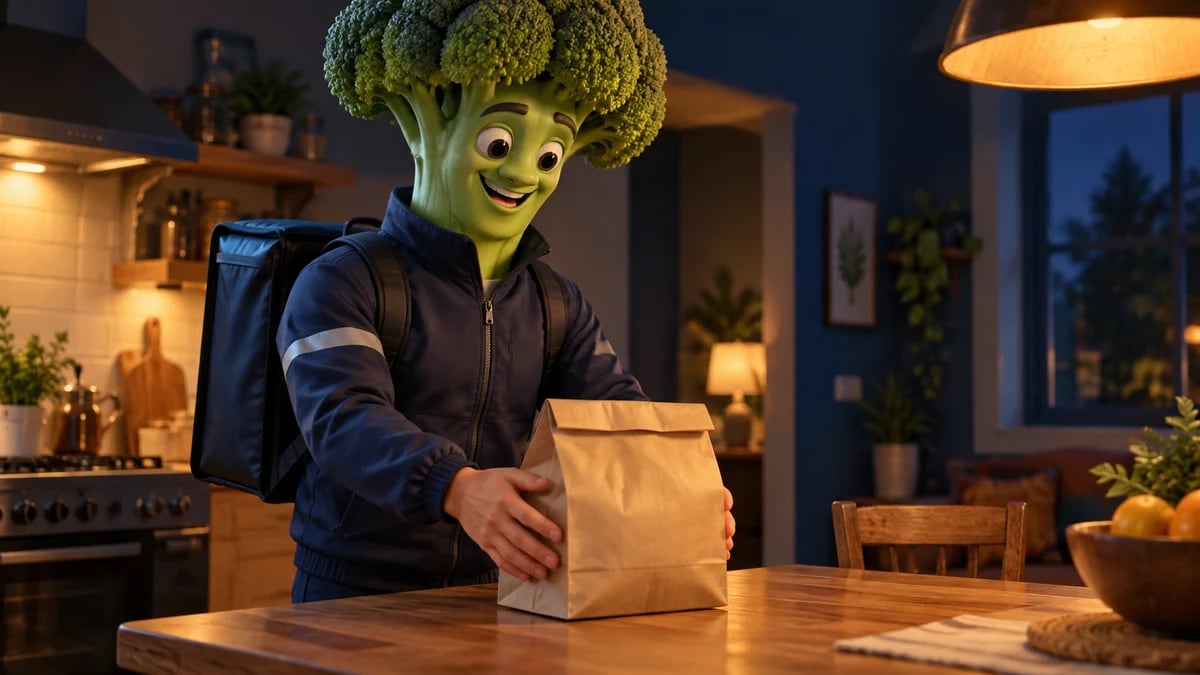
Define the food head and human body
- Edible head: specify the whole ingredient and recognizable shape, such as a pear or broccoli crown. Describe eyes, brows and a mouth formed in that surface.
- Body and clothing: state that the body is a stylized adult human, then fix the jacket, trousers and accessories. That distinguishes your design from a food item with only tiny arms.
- Action and prop: decide whether the character carries, places or opens the object. Keep important hands and contact points in frame.
Original brief: broccoli delivers lunch
An adult broccoli delivery worker brings a plain paper bag to a kitchen table. The scene follows the bag from the character’s hands to the table. The line, “Lunch has arrived,” supports what the viewer sees.
This is an original writing example, not a generated or tested video. Adapt the idea to the character and setting you want to create.
CHARACTER: adult broccoli-headed delivery worker, stylized human body.
HEAD: green broccoli crown; eyes, brows and mouth formed in the florets.
OUTFIT: navy jacket, grey trousers, plain shoulder strap.
PROP: one cream paper bag, sealed, without logos or readable labels.
SETTING: calm kitchen entrance and an empty wooden table.
ACTION: both hands support the bag as the character places it on the table.
CAMERA: stable medium shot; face, hands and bag remain visible.
SPOKEN LINE: "Lunch has arrived."
REVIEW: hand contact, bag shape, outfit and bag position.
Track the bag between scenes
For a sequence, keep a small continuity note alongside the character reference. The bag’s state should change only when the story shows that change.
- Arrival: the bag is sealed and carried; the table is empty.
- Placement: the hands lower that same bag onto the table. Check that it does not pass through the fingers or surface.
- Confirmation: the bag remains on the table while the character releases it. Opening it would require another described action.
These are proposed scenes for planning, not rendered results. In Studio, compare the head, clothing, bag color and size in each image before animating it. Review the generated clips for changes at the cuts. With Express, check those details in the complete output after generation.
Continue with dialogue, reference images or a story
Use the talking fruit guide for the speaker, pronunciation and captions. Use the fruit story workflow for a sequence, or the fruit drama guide to develop the conflict and ending.
Frequently asked questions
What does AI food video mean here?
This page is about animated food characters, not footage of a real recipe. You can describe a fruit or vegetable head on a stylized human body, a visible face and a short action. FruitStory helps prepare and generate the story; inspect the result before sharing.
Can I create a vegetable character as well as a fruit?
You can describe the vegetable in your character brief, such as a broccoli head with a human body and a navy delivery jacket. Specify the face, silhouette and clothing, then check that the generated image follows that design.
How do I keep a bag or other prop consistent?
Describe its color, size, shape and position in your reference notes. Track whether it is sealed, open, carried or placed between scenes. Compare every image and video; a stable description does not guarantee identical props.
How do I prepare an action with hands?
Choose one visible task, such as placing a paper bag on a table. Describe where both hands are, what supports the object and how it moves. Keep the interaction visible in the frame and review fingers, contact and object position after generation.
Are AI food videos free?
Registration does not require a credit card. The 500 welcome credits cover one image, not a complete food video. Consult the costs page when planning your project. Studio shows each image or clip cost on its generation button; Express starts the complete story without a quote screen. Another attempt uses additional credits.
Is the broccoli delivery example a real generated result?
No. It is an original writing brief that has not been generated or tested as a video. The image is an illustration of a character, not proof of a generated clip.
Which page should I use for dialogue or a longer story?
Use the talking fruit guide to prepare the speaker, pronunciation and captions. Use the fruit story page to plan a sequence of scenes. This page focuses on the food character's physical design, hand actions and object continuity.
Prepare the design and prop notes. Use Studio for image review and individual clips, or Express for an automatic story; inspect the generated result before publishing.
Create my account →